AI Estimator
 Updated
by Russell B.
Updated
by Russell B.
The AI Estimator in XactRemodel and XactRestore is a powerful tool that can assist you with the following items:
- Projects and groups
- Search for and review existing projects
- Compare and contrast projects
- Create new groups (rooms or areas) within a project
- Rename and resize groups
- Delete groups
- Jobs and Estimates
- Search for, present details about, and apply Quick Estimates
- Line items
- Search for and add single line items
- Update quantities, descriptions, or pricing
- Delete line items
- List what is already present in a group
- Pricing
- View costs for items and adjustments
- Set custom pricing or revert to default pricing
- See tax calculations
How to access the AI Estimator
How to access the AI Estimator
To start using the AI Estimator, follow the steps below.
 The AI Estimator is part of the XactAI add-on. To purchase the XactAI add-on, contact our PropTech Sales Department at 833-352-9228 between 7:00 am - 4:00 pm (Mountain Time), Monday - Friday, or purchase it through our online store.
- Within a project, select Estimate.
- Enter your question.
- Select Send.
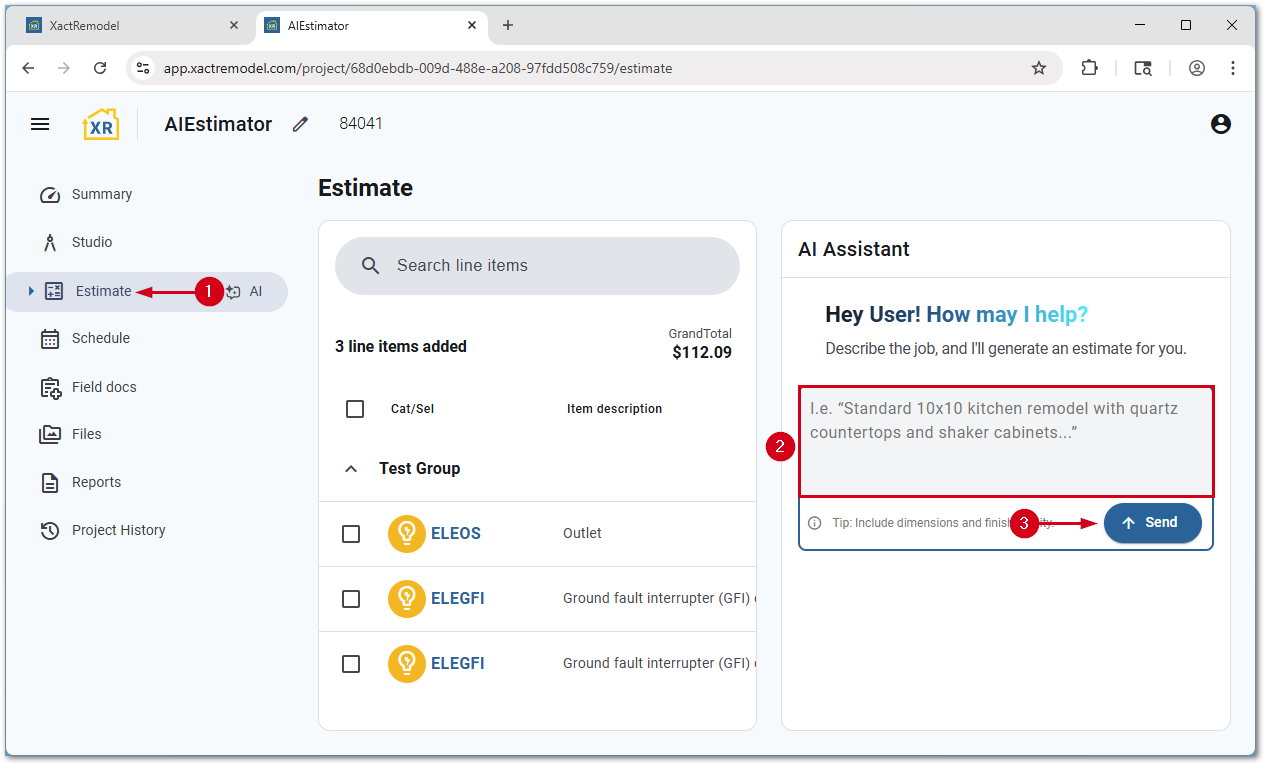
The AI Estimator responds with a series of questions to determine exactly what you want.
 CAUTION: Always review the actions taken by the AI Estimator.
Example prompts
Below are some example prompts, and the expected results from them.
- Help me build an estimate for a new bathroom.
- The AI Estimator searches available Quick Estimates and asks follow-up questions about the style (i.e. full bath, primary bathroom, half bath, etc.).
- Tell me the different tile floor options.
- The AI Estimator searches for available tile floor line items and gives a brief description of each option.
- Tell me the difference between ceramic tile qualities.
- The AI Estimator gives a brief description comparing the quality level options available.
- Create a 10x10x8 group and call it Basement.
- The AI Estimator creates a new group called Basement and adds the dimensions (10 ft x 10 ft x 8 ft).
- Add carpet to group name.
- The AI Estimator provides options for carpet and carpet pad.
- Replace item name with different item name in group name.
- The AI Estimator searches for the specified group name, removes the requested item, and adds the new requested item.